Decision criteria
These criteria define the page. A product is not rewarded for affiliate availability or commission.
- Permitted data use
- Field ownership
- Record identity
- Contact billing status
- Plan scope
- Recovery process
Documented shortlist
Commission rate and affiliate approval are not inputs to this order. Any active affiliate destination is identified on its link.
UpLead Documented
A B2B prospecting-data service for finding and exporting business contacts into a CRM.
May not fit: Businesses that need a CRM rather than a lead-data source
HubSpot Documented
A broad CRM and sales platform with a documented free entry point and a much wider upgrade path.
May not fit: Buyers who want simple, predictable costs at higher tiers
Workflow fit matrix
“Connected” can mean another product in the vendor suite or a documented integration. Confirm the exact plan and connection before buying.
| Workflow | UpLead | HubSpot |
|---|---|---|
| Lead generation | Documented native | Documented native |
| CRM | Connected product / integration | Documented native |
| Proposals | Not documented for this role | Documented native |
| Scheduling | Not documented for this role | Documented native |
| Client portal | Not documented for this role | Not documented for this role |
| Project delivery | Not documented for this role | Connected product / integration |
| Invoicing | Not documented for this role | Connected product / integration |
| Automation | Connected product / integration | Documented native |
A gated CRM handoff
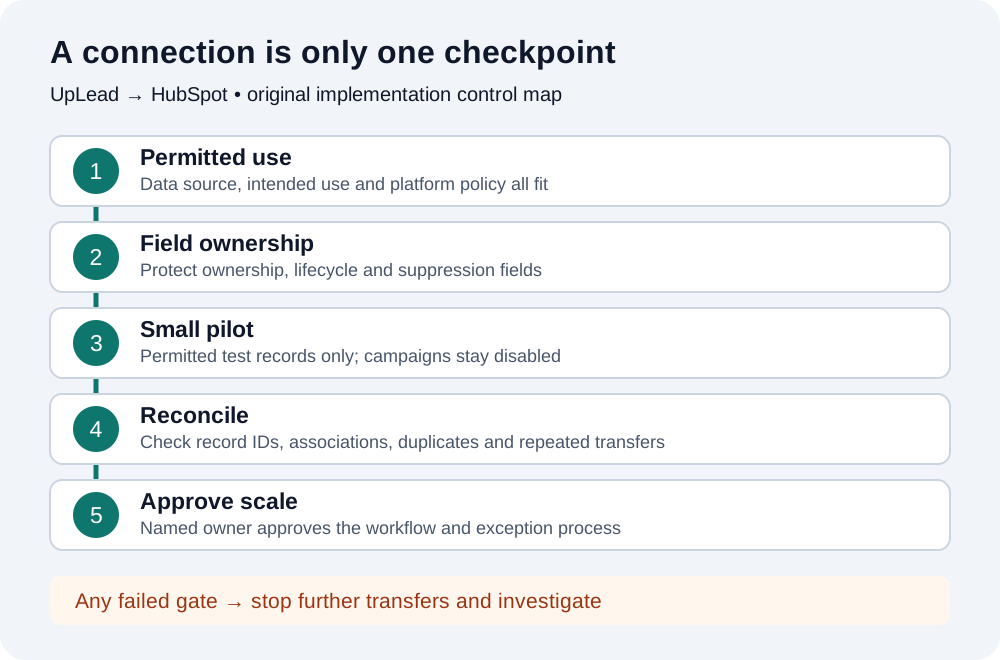
Proposed field-ownership matrix
| Field group | Proposed owner | Pilot acceptance check |
|---|---|---|
| Contact identity | CRM administrator | Correct person and existing record ID; no unexpected second contact |
| Company association | CRM administrator | Correct company ID; domain matching alone is insufficient |
| Source / provenance | Acquisition operations | Source remains distinguishable from consent and campaign eligibility |
| Owner and lifecycle stage | Existing CRM process | No reassignment or stage regression without explicit approval |
| Consent / suppression | Approved permission process | No fabricated consent or overwritten restriction |
Five scenarios to check before a larger transfer
| Scenario | Inspect | Stop condition |
|---|---|---|
| Correct destination | Account, object and mapped internal property names | Record lands in the wrong account or object |
| Existing contact and company | Starting IDs, associations and record counts | Unexpected duplicate or association change |
| New permitted record | Required fields, source and review owner | Missing context or unapproved marketing enrollment |
| Protected-field conflict | Existing owner, stage and suppression values | Any unauthorized overwrite |
| Repeat the same transfer | New records, changed fields and observed credit usage | Unexplained duplication, changes or charges |
First gate: is the intended use allowed?
HubSpot's marketing-email guidance excludes purchased, rented, borrowed and third-party lists. A provider's claim that its contacts opted in does not make a purchased list eligible for HubSpot marketing email. Do not buy UpLead expecting to turn its database into an automatically enrolled HubSpot marketing audience.
HubSpot's contact importer also requires confirmation that contacts expect to hear from you and the file does not include a purchased list. A CSV export is not a workaround. If the source or intended CRM use is uncertain, obtain clarification from the vendors before transferring records. Technical connectivity does not settle permission, consent or jurisdiction-specific obligations.
Important: This is an operational decision guide, not legal advice. Do not mark consent as granted, remove suppression flags or make false import confirmations to complete a test.
What the documented native setup includes
UpLead's instructions start under the profile menu: choose Connect to my CRM, select HubSpot and authorize the intended account through OAuth. Review the requested contact, company and lead permissions with the account administrator before connecting.
Under Customize Integration, select the relevant record tab. Field Name must match HubSpot's internal API property name, not simply its display label. Choose a predefined mapping or a custom value, and use Exclude Fields for values that should not transfer. Preserve required fields. UpLead documents company creation as dependent on HubSpot's automatic company-generation setting and warns about possible company duplicates.
Write a field-ownership contract before mapping
For a boutique agency, the useful output is a record the right person can review, not the largest possible sync. Make a short mapping sheet containing the source field, destination internal name, object type, allowed overwrite behavior and responsible owner. Treat the matrix below as a proposed control design, not a claim about default connector behavior.
Separate provenance from consent. A source label such as UpLead tells a reviewer where a record came from; it does not demonstrate permission to send an email. If the connector cannot preserve a protected field, exclude that field or hold the transfer rather than accepting silent overwrites.
Do not assume a company domain prevents duplicates
HubSpot documents contact deduplication using email in supported creation and import flows, but that is not a guarantee for every connector operation. Its company-domain deduplication explicitly does not apply to companies created through the API, including third-party sync applications. UpLead's own duplicate warning makes this a real pilot gate.
Use permitted test records with known starting IDs. Compare before-and-after record counts and associations, not only a success message. A repeated transfer should trigger review of both contact and company outcomes. Do not assume an update, overwrite, merge or credit refund without evidence from your account and the vendor.
Keep marketing-contact billing separate from consent
For eligible Marketing Hub subscriptions, HubSpot says contacts created through connected OAuth apps are non-marketing by default; administrators can change the integration setting. New marketing contacts count toward the billable contact tier. Setting changes affect newly created contacts, so review existing records separately.
Check the actual connected-app setting before a pilot. Non-marketing status is a billing and tool-access designation, not a legal permission or a blanket authorization to store purchased data. Do not enable marketing status or campaign workflows merely to test whether a sync succeeded.
Budget the complete handoff, not an assumed free integration
UpLead lists CRM integration from Essentials, while its Professional offer separately lists full API access and bidirectional CRM sync. Do not equate a basic native connection with a guaranteed two-way synchronization service. Confirm the required direction, object support and tier before purchasing.
The existing UpLead pricing guide owns subscription and credit calculations. Use the HubSpot pricing guide for CRM plan context and the TCO Calculator for your known subscriptions and explicit implementation assumptions. A connector's availability does not establish a zero-cost complete workflow. Add middleware only when a specific routing or transformation requirement cannot be met natively, after verifying its actions, limits and price.
Run a controlled pilot, then reconcile before expanding
Start with a small set of owned or otherwise permitted test records and record the starting values and IDs. Leave campaigns disabled. Assign one administrator to review the scenarios below and one business owner to approve the resulting workflow. A technical pass without a permitted use case is still a stop.
UpLead documents Disable HubSpot under its CRM integration settings to disconnect. Disconnection is not evidence that earlier writes are undone. If a pilot fails, stop additional transfers, compare the affected IDs with the starting snapshot and plan record-specific corrections with the administrator. Do not mass-delete companies or overwrite a production CRM as a rollback shortcut.
Scale only after the owner can explain what moves, what stays unchanged, how an exception is detected and who resolves it. Measure accepted records and cleanup time using your own observations; this guide does not predict leads, sales or affiliate earnings.
Frequently asked questions
Does UpLead have a native HubSpot integration?
Yes, UpLead documents an OAuth connection and customizable record-field mapping. Confirm that its scope and your selected plan meet the required workflow; basic integration is not a promise of every two-way sync feature.
Will the integration automatically remove company duplicates?
Do not assume that. UpLead warns about company duplicates, and HubSpot excludes API-created companies from automatic company-domain deduplication. Validate actual record IDs and repeated-transfer behavior in a controlled pilot.
Can I enroll purchased UpLead contacts in HubSpot marketing email?
HubSpot's marketing-email policy excludes purchased and third-party lists. A working integration and a marketing-contact billing setting do not establish permission. Do not use CSV import as a policy bypass.
Sources
Material product and pricing facts were checked against the official sources below. Each record shows its actual verification date.
- UpLead: How to integrate UpLead with HubSpot Checked Sep 8, 2026 · OAuth connection, internal property names, excluded fields and company-duplicate warning.
- HubSpot: Deduplicate records in HubSpot Checked Sep 8, 2026 · Company-domain deduplication does not apply to API-created companies, including third-party sync apps.
- HubSpot: Manage marketing contacts settings for integrations Checked Sep 8, 2026 · Eligible Marketing Hub subscriptions; OAuth-created contact defaults and billable marketing-contact settings.
- HubSpot: Understand opt-in consent for email Checked Sep 8, 2026 · Purchased, rented, borrowed and third-party lists cannot be used in HubSpot marketing email.
- HubSpot: Import records and activities Checked Sep 8, 2026 · Contact-import confirmation includes expected contact and no purchased-list conditions; CSV is not a policy bypass.
- HubSpot: Sales Hub pricing Checked Sep 3, 2026 · Public USD Sales Hub pricing view.
- HubSpot: Free CRM pricing Checked Sep 3, 2026 · Free-tools limits and CRM entry point.
- HubSpot: Starter Customer Platform Checked Sep 3, 2026 · Limited new-customer offer; not an advanced Sales Hub tier.
- HubSpot: Product and Services Catalog Checked Sep 3, 2026 · Plan, commitment, seat and usage terms.
- UpLead: UpLead pricing Checked Sep 7, 2026