Decision criteria
These criteria define the page. A product is not rewarded for affiliate availability or commission.
- Pipeline and follow-up workflow
- Automatic relationship-data capture
- Email and calendar operation
- Automation and permissions tier
- Pricing and billing context
- Export and migration path
- Post-sale client-work boundary
Products compared
Commission rate and affiliate approval are not inputs to this order. Every current destination is a standard vendor link.
Pipedrive Documented
A pipeline-focused CRM whose higher plans add lead capture, scheduling, automation and document workflows.
May not fit: Businesses that need a native client portal or full delivery workspace
Salesflare Documented
A B2B CRM centered on automatic email, calendar and relationship-data capture.
May not fit: Businesses that need a native project-delivery, invoicing or client-portal module
Workflow fit matrix
“Connected” can mean another product in the vendor suite or a documented integration. Confirm the exact plan and connection before buying.
| Workflow | Pipedrive | Salesflare |
|---|---|---|
| Lead generation | Documented native | Documented native |
| CRM | Documented native | Documented native |
| Proposals | Limited fit | Connected product / integration |
| Scheduling | Documented native | Limited fit |
| Client portal | Not documented for this role | Not documented for this role |
| Project delivery | Limited fit | Connected product / integration |
| Invoicing | Connected product / integration | Connected product / integration |
| Automation | Documented native | Documented native |
Pipedrive vs Salesflare decision map
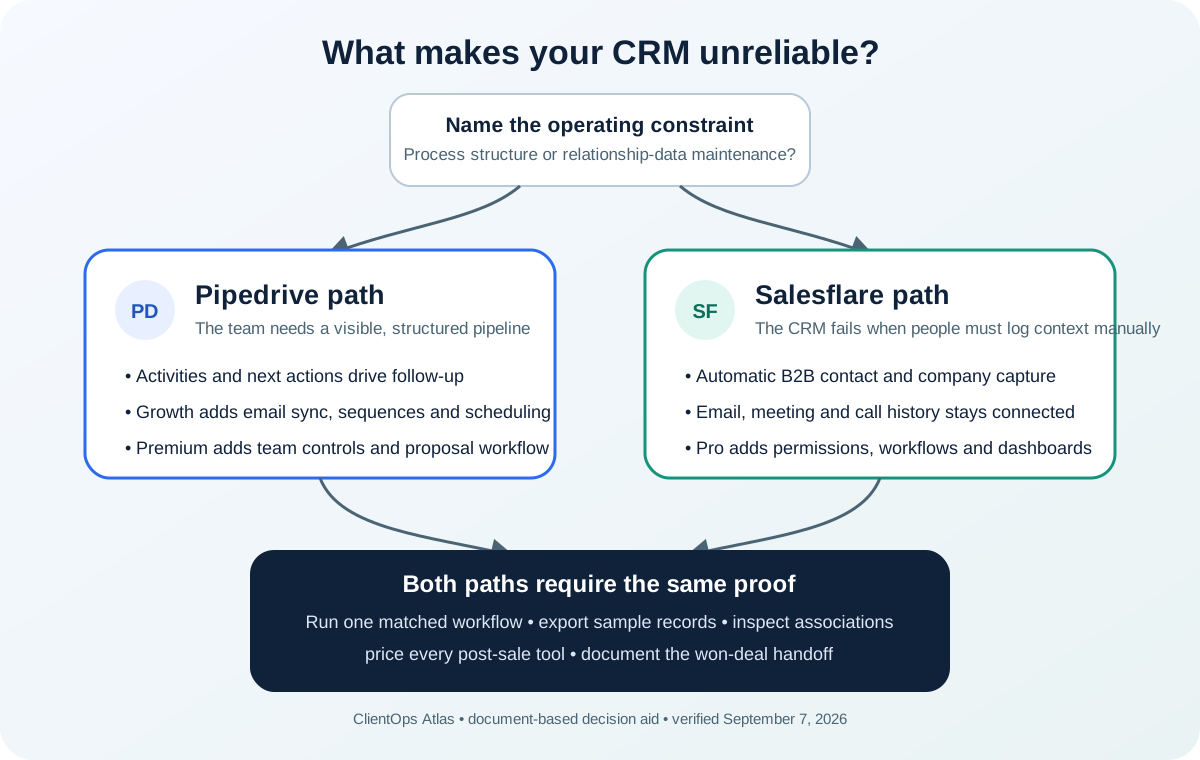
Matched decision matrix
This matrix compares documented product paths, not hands-on ratings. Plan labels are selected by the job described and are not assumed to be feature-equivalent.
| Decision | Pipedrive | Salesflare |
|---|---|---|
| Core operating model | Visual pipeline with activities, follow-up, reporting and tiered sales-workflow features | B2B CRM with automatic contact, company, email, meeting and call capture |
| Entry paid path used here | Growth: €39 per seat monthly equivalent, €468 billed annually | Growth: $29 per user monthly equivalent, $348 billed annually |
| Email and follow-up | Growth documents full email sync, tracking, automations and nurturing sequences | Growth documents automatic email capture, tracking and personalized email campaigns |
| Scheduling | Growth documents a meeting scheduler | Calendar capture is documented; a native hosted public scheduling page is not assumed |
| Team controls step-up | Premium documents enhanced permissions, reporting, data fields, lead routing and proposals | Pro documents user permissions, multi-email workflows and custom dashboards |
| Exports | CSV/XLSX exports cover major objects; activities, notes and files require separate exports | CSV/Excel exports cover accounts, contacts and opportunities; inspect fields and associations in a sample |
| Post-sale client work | Premium includes project capabilities and proposals, but invoicing and client-portal needs still require verification | Project delivery, proposals and invoicing rely on connected products; no native client portal is documented |
Annual license scenarios
The table multiplies the selected annual invoice by billable users. It excludes tax, add-ons, implementation labor and connected post-sale tools.
| Selected record | 1 user | 5 users | 10 users |
|---|---|---|---|
| Pipedrive Growth annual | €468 | €2,340 | €4,680 |
| Salesflare Growth annual | $348 | $1,740 | $3,480 |
| Pipedrive Premium annual | €708 | €3,540 | €7,080 |
| Salesflare Pro annual | $588 | $2,940 | $5,880 |
The central difference is who maintains relationship context
Pipedrive provides the clearer traditional pipeline model: a consultant defines stages, activities and next actions, then uses automation and sequences to make the process repeatable. It is a strong fit when the team will maintain the process and wants the pipeline to be the operational center.
Salesflare documents automatic collection of contact and company information from email, signatures and social profiles, plus automatic meeting and phone-call logging. That is a materially different proposition for a small B2B team whose CRM becomes incomplete when people forget manual updates.
Do not compare the headline numbers without context
The verified Pipedrive view displayed EUR prices excluding VAT. The verified Salesflare view displayed both USD and EUR sections; this comparison preserves the existing USD evidence record rather than mixing localized currencies.
The cheaper license is not automatically the cheaper operating system. Price the minimum plan for required permissions, reporting, proposals, sequences and scheduling, then add every connected project, invoicing or client-portal product.
Match the automation tier to the actual workflow
Pipedrive Growth documents automations and nurturing sequences. Salesflare Growth documents personalized campaigns, while Pro is the documented step for multi-email workflows, permissions and custom dashboards.
Write the automation on paper before choosing a plan: trigger, required fields, owner, action, failure alert and opt-out behavior. A feature label without a tested operating rule is not a complete workflow.
Run a small export before committing
Pipedrive documents object-level CSV or XLSX exports and separate handling for activities, notes and files. Salesflare documents Excel or CSV exports for accounts, contacts and opportunities. Neither statement proves that every relationship, attachment or automation can be reconstructed elsewhere.
Create two accounts, three contacts, two opportunities, one completed activity, one future activity, a note and a file. Export the available records, inspect identifiers and associations, and record what would need a second export or manual reconstruction.
Keep the client-delivery boundary visible
Both products are sales CRMs. Pipedrive documents project capabilities on Premium or through the Projects add-on and proposals on Premium. Salesflare documents connected product paths for proposals, projects and invoicing. A secure client portal is not established by those connections.
Map the won-deal handoff into onboarding, delivery, time, invoice and client communication. If another system owns those stages, include its cost and the integration failure path in the decision.
Use the same 30-minute trial script
Create the same sample consultancy in both products. Add a referral lead and an inbound lead, connect a noncritical email and calendar account, move one opportunity through the full pipeline, schedule the next action, trigger one safe automation and export the sample data.
Record setup time, fields entered manually, fields captured automatically, clicks to find the last client promise, minimum paid tier and missing post-sale handoffs. This page does not claim ClientOps Atlas completed those private trials.
Frequently asked questions
Is Pipedrive or Salesflare better for a solo consultant?
Pipedrive is the stronger documented fit when the consultant wants a visible pipeline, built-in scheduler and a broader native sales workflow. Salesflare is the stronger documented fit when automatic B2B relationship capture is the main adoption problem. The final choice should follow the same workflow and export test in both products.
Which is cheaper, Pipedrive or Salesflare?
The verified annual-billing records use different currencies: Pipedrive Growth is €468 per seat per annual invoice, while Salesflare Growth is $348 per user per annual invoice. A direct winner requires an explicit exchange rate, tax context and matched-feature plan, so this page does not declare one from headline price alone.
Does either CRM replace project management and invoicing?
No complete replacement is assumed. Pipedrive documents project and proposal paths at higher tiers or through add-ons; Salesflare documents connected products. Verify the exact delivery, client-portal and invoicing workflow separately.
Sources
Material product and pricing facts were checked against the official sources below. Each record shows its actual verification date.
- Pipedrive: Pipedrive pricing Checked Sep 7, 2026 · Public EUR annual-rate view; prices exclude VAT and can localize by visitor.
- Pipedrive: Exporting data from Pipedrive Checked Sep 7, 2026 · Global export and separate activity, note and file export limits.
- Salesflare: Salesflare pricing Checked Sep 7, 2026 · Public USD per-user monthly and annual-billing prices.
- Salesflare: Salesflare integration catalog Checked Sep 7, 2026
- Salesflare: Export Salesflare data Checked Sep 7, 2026 · Account, contact and opportunity export scope.