Decision criteria
These criteria define the page. A product is not rewarded for affiliate availability or commission.
- Solo setup burden
- Pipeline clarity
- Scheduling and email
- Automation
- Proposal and billing handoff
- One-year ownership cost
Documented shortlist
Commission rate and affiliate approval are not inputs to this order. Every current destination is a standard vendor link.
Pipedrive Documented
A pipeline-focused CRM whose higher plans add lead capture, scheduling, automation and document workflows.
May not fit: Businesses that need a native client portal or full delivery workspace
Zoho CRM Documented
A configurable CRM with a three-user free edition and connections to the wider Zoho client-operations suite.
May not fit: Buyers who want minimal configuration and one simple interface
HubSpot Documented
A broad CRM and sales platform with a documented free entry point and a much wider upgrade path.
May not fit: Buyers who want simple, predictable costs at higher tiers
Copper Documented
A Google Workspace-centered CRM with native pipelines, lead forms, booking links and project records.
May not fit: Teams that do not operate in Google Workspace
Salesflare Documented
A B2B CRM centered on automatic email, calendar and relationship-data capture.
May not fit: Businesses that need a native project-delivery, invoicing or client-portal module
Attio Documented
A flexible relational CRM with configurable objects, email and calendar sync, and workflows.
May not fit: Buyers who want a prescriptive out-of-the-box service workflow
Workflow fit matrix
“Connected” can mean another product in the vendor suite or a documented integration. Confirm the exact plan and connection before buying.
| Workflow | Pipedrive | Zoho CRM | HubSpot | Copper | Salesflare | Attio |
|---|---|---|---|---|---|---|
| Lead generation | Documented native | Documented native | Documented native | Documented native | Documented native | Limited fit |
| CRM | Documented native | Documented native | Documented native | Documented native | Documented native | Documented native |
| Proposals | Limited fit | Connected product / integration | Documented native | Connected product / integration | Connected product / integration | Connected product / integration |
| Scheduling | Documented native | Connected product / integration | Documented native | Documented native | Limited fit | Limited fit |
| Client portal | Not documented for this role | Documented native | Not documented for this role | Not documented for this role | Not documented for this role | Not documented for this role |
| Project delivery | Limited fit | Connected product / integration | Connected product / integration | Documented native | Connected product / integration | Connected product / integration |
| Invoicing | Connected product / integration | Connected product / integration | Connected product / integration | Connected product / integration | Connected product / integration | Not documented for this role |
| Automation | Documented native | Documented native | Documented native | Documented native | Documented native | Documented native |
Two checks before choosing a CRM
Use these short explanations alongside the workflow-first comparison. A free starting point or a long feature list does not establish the best fit for your consulting work.
Loading a video connects to YouTube (Google), which may process device and usage data. No player loads until you choose one.
Free CRM: Check This Upgrade Trigger First
Identify the requirement that could push your workflow beyond a free plan. 43 sec
Three Questions Before You Shortlist a CRM
Clarify the workflow you need before comparing the documented options. 36 sec
Consultant CRM decision tree
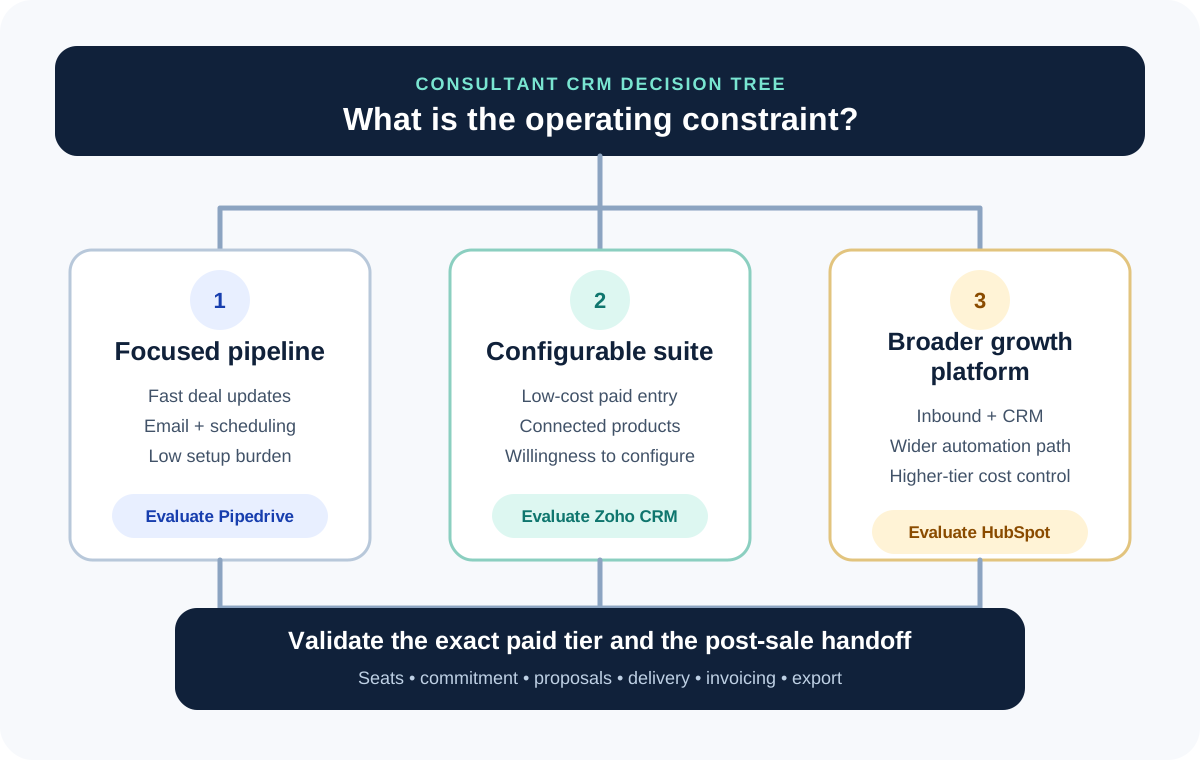
CRM shortlist by consultant operating model
The same product can be economical for one workflow and expensive for another. These are documented plan signals, not hands-on ratings.
| Decision | Pipedrive | Zoho CRM | HubSpot | Copper | Salesflare | Attio |
|---|---|---|---|---|---|---|
| Free or trial entry | 14-day trial; no permanent free plan documented | Free edition for up to 3 users | Free tools for up to 2 users | 14-day trial; no permanent free plan documented | 30-day trial; no permanent free plan documented | Free plan for up to 3 seats |
| Focused solo pipeline | Core strength; Lite covers lead, deal, contact, calendar and pipeline work | Capable, but expects more configuration choices | Useful when sales connects to a wider inbound platform | Google Workspace-centered CRM and lightweight project path | Automatic B2B email, calendar and relationship capture | Flexible objects and relationships for a custom operating model |
| Automation step-up | Growth adds automations, sequences, email sync, scheduling and forecast reports | Paid tiers expand workflow and connected-suite options | Professional is the documented step for fully customizable workflows | Task and workflow automation are documented; limits vary by tier | Growth includes campaigns; Pro adds multi-email workflows | Workflows are native, but exact plan entitlements require checkout verification |
| Proposal handoff | Premium documents contracts and e-signatures | Connected product or CPQ path; confirm the exact signing workflow | Treat proposals as a separate requirement unless the exact HubSpot path is documented | Connected proposal applications; confirm the exact app and plan | Connected proposal products rather than a native authoring module | Connected proposal application path rather than a native editor |
| Illustrative annual license record | €468 per seat for Growth | $168 per user for Standard | $1,080 per Sales Hub Professional seat plus required $1,500 onboarding | $276 per seat for Basic | $348 per user for Growth | $420 per seat for Plus; maximum 10 seats |
For a solo consultant, friction is a real cost
A solo consultant normally benefits from one visible pipeline, a small required-field set, reliable email and calendar capture, and a next action on every live opportunity. A platform that takes weeks to configure can cost more in delayed follow-up than it saves in subscription price.
Begin with one real lead-to-proposal workflow. If the consultant cannot update a deal, schedule the next step and find the latest promise in under a few minutes, the implementation is too heavy for the current operating model.
A growing consultancy changes the decision
At two to five users, shared ownership, field discipline and pipeline definitions matter more. At six to twenty users, permissions, reporting, routing and change control become buying criteria rather than optional polish.
Do not assume the solo winner remains the team winner. Price the minimum plan that supports the team workflow, every paid seat and the post-sale tools that still sit outside the CRM.
Run the same trial script in every CRM
Create one company, two contacts, one referral lead and one inbound lead. Move both opportunities through discovery, proposal sent, negotiation, won and lost. Record a next action, reschedule it, hand a won deal to delivery and export the records.
Use the same sample data and time each workflow. The objective is not a theatrical demo; it is to expose missing fields, duplicate entry, hidden plan limits and the point where the CRM stops owning the process.
- Confirm email and calendar behavior with a noncritical test account
- Test mobile updates from a real follow-up situation
- Export before the trial ends and inspect the resulting files
- Record the paid tier required for every must-have feature
A CRM is not automatically a client-delivery system
Winning a deal does not prove the product can manage onboarding, client approvals, project delivery, time, invoicing or a secure client portal. Mark the system of record for each stage before describing any CRM as complete client-management software.
If the CRM needs specialist tools after signature, include those subscriptions, integrations and administrative handoffs in the ownership decision.
Price the exit before buying
HubSpot and Pipedrive document record exports, but activities, notes, attachments and externally hosted files can require separate handling. Copper exports core CRM and project objects while activity history requires Support assistance. Salesflare exports accounts, contacts and opportunities; Attio documents list-level CSV and a full-workspace CSV backup.
Keep a field dictionary, pipeline-stage map, owner map and attachment inventory. A lower subscription is not a saving if the business cannot reconstruct its relationship history later.
Frequently asked questions
What is the best CRM for a solo consultant?
There is no universal winner. Pipedrive, Zoho CRM and HubSpot provide three baseline paths; Copper, Salesflare and Attio add Google Workspace, automatic-capture and flexible-data-model alternatives. The correct choice depends on the required workflow and paid tier.
Should a consultant start with a free CRM?
A free plan is useful when its user, pipeline, automation and export limits fit the real process. It is not useful if the first essential handoff immediately requires a paid tier or another tool.
Does this ranking use affiliate commission?
No. Affiliate state and commission are excluded from the recommendation logic. The current destination type is labeled beside every merchant link.
Sources
Material product and pricing facts were checked against the official sources below. Each record shows its actual verification date.
- HubSpot: Sales Hub pricing Checked Sep 3, 2026 · Public USD Sales Hub pricing view.
- HubSpot: Free CRM pricing Checked Sep 3, 2026 · Free-tools limits and CRM entry point.
- HubSpot: Starter Customer Platform Checked Sep 3, 2026 · Limited new-customer offer; not an advanced Sales Hub tier.
- HubSpot: Product and Services Catalog Checked Sep 3, 2026 · Plan, commitment, seat and usage terms.
- HubSpot: Export records Checked Sep 3, 2026 · Record export scope and separate activity-export considerations.
- Pipedrive: Pipedrive pricing Checked Sep 7, 2026 · Public EUR annual-rate view; prices exclude VAT and can localize by visitor.
- Pipedrive: Exporting data from Pipedrive Checked Sep 7, 2026 · Global export and separate activity, note and file export limits.
- Zoho: Zoho CRM pricing Checked Sep 2, 2026 · US pricing reference; local currency and tax can differ.
- Zoho: Zoho CRM product overview Checked Sep 2, 2026
- Zoho: Export CRM data Checked Sep 7, 2026 · Module CSV/XLSX exports, complete-backup path, permissions, record limits and download-window details.
- Copper: Copper pricing and plan features Checked Sep 3, 2026 · Public USD per-seat prices and feature grid.
- Copper: Copper trial signup Checked Sep 3, 2026 · Fourteen-day trial and signup requirements.
- Copper: Creating a lead form Checked Sep 3, 2026
- Copper: Automatically book meetings with leads Checked Sep 3, 2026
- Copper: Export data from Copper Checked Sep 3, 2026 · Core-object export and activity-history limitation.
- Salesflare: Salesflare pricing Checked Sep 7, 2026 · Public USD per-user monthly and annual-billing prices.
- Salesflare: Salesflare integration catalog Checked Sep 7, 2026
- Salesflare: Export Salesflare data Checked Sep 7, 2026 · Account, contact and opportunity export scope.
- Attio: Attio pricing and plan features Checked Sep 3, 2026 · Public USD seat prices and seat-count limits.
- Attio: Attio workflows Checked Sep 3, 2026
- Attio: Attio app catalog Checked Sep 3, 2026
- Attio: Attio imports and exports Checked Sep 3, 2026 · List export and full-workspace backup formats.